# Overview
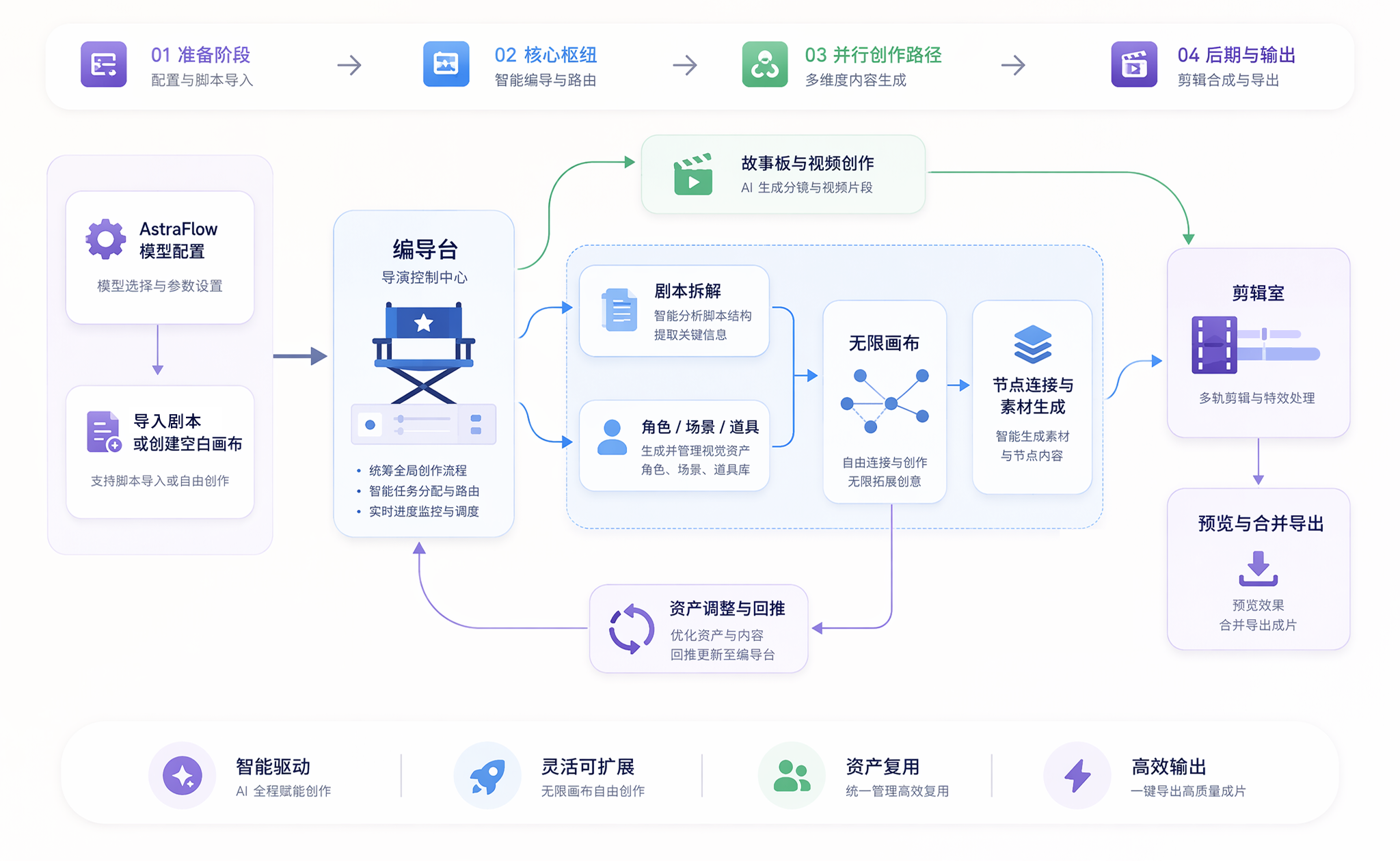
Start with a script, assets, and a storyboard, then produce an AI short-drama episode across the Director Console, Infinite Canvas, and Editor.
Bomiio is an AI orchestration tool for film and video creators. Start with an episode script and let the Director Console break it down into characters, scenes, props, and shots. Bring those assets into the Infinite Canvas to freely refine images, videos, and other media through connected nodes, then assemble and export the final video in the Editor.
#### [Quickstart](/docs/bomitv/getting-started/quickstart.md) | [Create Your First Episode](/docs/bomitv/getting-started/first-episode.md) | [Infinite Canvas](/docs/bomitv/canvas/overview.md) | [FAQ](/docs/bomitv/help/faq.md)
---
## From Script to Final Video
The Director Console turns a script into reusable assets and shots. The Infinite Canvas provides a more flexible space for refining media, while the Editor assembles Director Console assets, storyboards, and canvas media into the final video.
## Recommended Learning Path
### Step 1: Complete Your First Episode
1. [Connect AstraFlow](/docs/bomitv/getting-started/astraflow.md) to prepare the models required for creation.
2. Follow [Create Your First Short-Drama Episode](/docs/bomitv/getting-started/first-episode.md) to complete the entire script, asset, storyboard, video, and export workflow.
3. If a task fails, check the [Task Queue](/docs/bomitv/reference/tasks.md) first and retry only the failed stage.
### Step 2: Learn the Standard Creation Workflow
1. Learn how the [Director Console](/docs/bomitv/director/overview.md) processes scripts and assets.
2. Learn how to review and complete [characters, scenes, and props](/docs/bomitv/director/assets.md).
3. Use the [Storyboard](/docs/bomitv/director/storyboard.md) to review shot order and visual direction.
4. Organize media and the timeline in the [Editor](/docs/bomitv/editor/overview.md).
### Step 3: Refine Work on the Infinite Canvas
1. Learn about [canvas nodes](/docs/bomitv/canvas/nodes.md) and [connections](/docs/bomitv/canvas/connections.md).
2. Bring Director Console assets into the canvas for refinement.
3. Follow [Refine and Push Back Assets](/docs/bomitv/workflows/refine-assets.md) to save a successful result as a new variant or merge it into the original variant.
## Core Capabilities
| Capability | What You Can Do | Documentation |
| --- | --- | --- |
| Script-driven creation | Upload or paste an episode script and progressively produce assets, shots, and storyboards | [Director Console](/docs/bomitv/director/overview.md) |
| Asset consistency | Manage characters, scenes, props, variants, and views across episodes | [Asset Management](/docs/bomitv/director/assets.md) |
| Infinite Canvas and node workflows | Connect text, image, video, audio, and asset nodes to freely generate and refine media | [Infinite Canvas](/docs/bomitv/canvas/overview.md) |
| Storyboards and video creation | Review scene groups and shots, then generate still frames and video media | [Storyboard](/docs/bomitv/director/storyboard.md) |
| Timeline editing | Arrange Director Console and canvas media, split clips, change speed and audio, and preview the episode | [Editor](/docs/bomitv/editor/overview.md) |
| Task tracking | Inspect queued, running, completed, and failed tasks to diagnose individual problems | [Task Queue](/docs/bomitv/reference/tasks.md) |
> Available models and generation methods depend on the current AstraFlow connection and the options shown in the interface.
## Frequently Asked Questions
### What is the fastest way to create my first short-drama episode?
Follow [Create Your First Episode](/docs/bomitv/getting-started/first-episode.md). Start by importing a script, then complete asset confirmation, storyboarding, video generation, editing, and export in order.
### Can I change the content language?
The content language cannot be changed after a canvas is created. See [Interface and Content Languages](/docs/bomitv/reference/languages.md) for the distinction between interface language and content language, and what to do if you choose the wrong setting.
### How do I correct a character or scene appearance?
Edit the description, variant, reference image, or current view in the asset editor. See [Asset Editing](/docs/bomitv/director/asset-editing.md).
### How do I batch-complete missing asset images or storyboard stills?
After confirming asset descriptions and generation settings, you can batch-generate assets without primary images or scene groups without still frames. See [Batch Generation](/docs/bomitv/director/batch-generation.md).
### How do I freely refine assets on the Infinite Canvas?
Bring a Director Console asset into the Infinite Canvas, continue refining it with upstream text and image media, then push the successful result back to the Director Console. See [Asset Refinement and Push-back](/docs/bomitv/canvas/asset-workflow.md).
### Where can I find previously generated media?
Use the canvas upload entry point or history panel to filter and reuse media already available in the current canvas. See [Uploads and Media History](/docs/bomitv/canvas/uploads-history.md).
### How do I change clip order, speed, or volume?
Open the Editor, arrange clips on the timeline, and use the relevant clip tools. See [Timeline Operations](/docs/bomitv/editor/timeline.md).
### How do I find the cause of a failed task?
Open the Task Queue, inspect the failed task type, model, and error summary, then retry only the affected stage. See [Task Queue](/docs/bomitv/reference/tasks.md).
### What should I do if model connection, content generation, or export fails?
Identify the stage where the problem occurred, then follow the corresponding checks in the [Troubleshooting Guide](/docs/bomitv/help/troubleshooting.md).